
Google Gemini
Google LLCProductivity
4.5187.26K Reviews
- Version
- 1.0.995038376
- Installs
- 1.00B
- Age Rating
- Teen
Screenshots
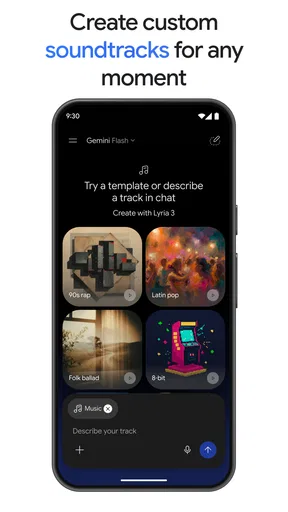
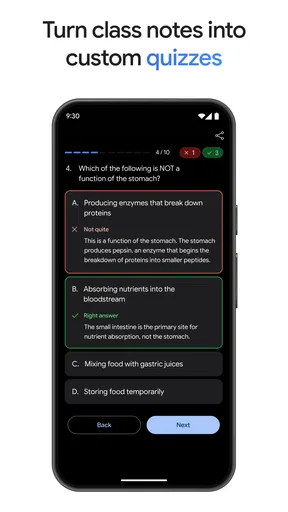
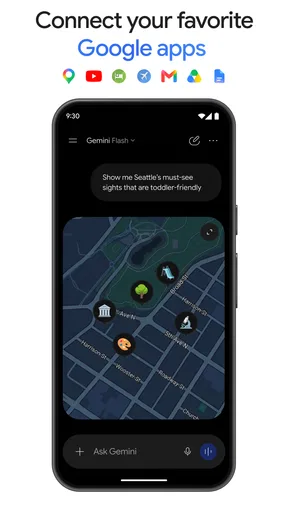
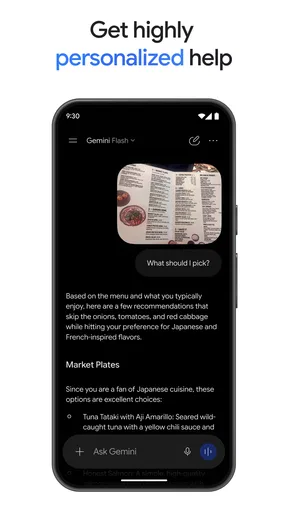
Our Review of Google Gemini
 Analysis by Appyee
I find Google Gemini most useful when I treat it as a flexible conversation partner, not a magic button that always gets things right. It can help me shape a rough idea into a plan, explain a topic in simpler language, or give me a starting point for writing. The key is to be specific about what I need and to check important answers before relying on them.
Making a conversation easier to follow
Gemini’s chat format is familiar: I type a request, read the response, and can continue with a follow-up instead of starting over. That conversational flow is handy when I’m still working out what I want. For example, I can ask for a first draft of a message, then request a warmer tone or a shorter version. I don’t have to get the wording perfect on the first try.
That simplicity has a trade-off. A long reply can take more effort to scan than a short list, and a chat can become hard to navigate when several unrelated tasks pile up in one thread. I get better results by keeping each conversation focused and asking for a clear format, such as a few steps or a brief comparison. If a response feels dense, I ask Gemini to break it into smaller pieces rather than trying to absorb everything at once.
For people who find a blank page difficult, this can be a useful way to begin. I might ask for an outline before drafting an article, or for a plain-language explanation before reading more deeply. It supports the first step, but it doesn’t remove the need to judge whether the answer fits my purpose.
Different ways to interact, different trade-offs
Typing gives me time to choose my words and review a response quietly. Speaking can be more convenient when my hands are occupied, but voice interaction is not automatically easier for everyone: background noise, speech differences, privacy, and the setting all matter. I wouldn’t assume that one input style works equally well for every person or situation.
There’s a practical distinction between asking Gemini to help think through a task and using a dedicated tool to complete it. A calendar or reminder app is usually the clearer choice when I need dependable scheduling and a quick view of events. A notes app is better for storing information I want to find later. Gemini can help me formulate a plan or make sense of text, but I still check that a consequential action has actually been completed rather than treating a conversational answer as proof.
When the context changes
On a phone, short requests suit the chat format better than long, complicated prompts. I can ask for a compact checklist while preparing to leave home, then revisit the details when I’m in a quieter place. If I’m in public, I prefer typing when speaking aloud would be awkward or expose personal information. For hands-busy moments, voice may feel more natural, provided the surroundings make it practical.
Here’s an ordinary example: before a busy afternoon, I could ask for help turning a few errands and a work deadline into a sensible order. I’d give the constraints that actually matter—what has a fixed time, what can wait, and how much detail I want—then review the suggestion against my real schedule. The useful part is getting an initial structure quickly; the limitation is that I remain responsible for checking whether it accounts for every commitment.
Who may find it useful—and who may not
As a productivity app from Google LLC, Gemini is aimed at people who want to ask questions and develop ideas through conversation. It is free, carries a Teen age rating, and has an average rating of 4.6 from around 36 million ratings. Its 1 billion-plus installs suggest that it has reached a very broad audience, though popularity alone can’t tell me whether it fits an individual’s needs.
I’d consider it if I regularly need help outlining, rephrasing, brainstorming, or understanding a subject at different levels of detail. I’d be more cautious if I need a fixed, predictable workflow, an authoritative answer for a high-stakes decision, or a permanent filing system. In those cases, a specialist app, trusted reference, or qualified person is a better fit. The same goes for anyone who prefers not to use a chat-based tool: there’s no reason to force a conversational interface into a task that a simple list or form handles more clearly.
Compared with a conventional productivity app, Gemini is less like a tidy place to store tasks and more like a place to work through them in language. That makes it flexible, but it can also leave the next step less visible than a dedicated checklist. I use it to help decide what to write or how to approach a problem, then move the result into whichever tool I rely on to track or retain it.
Getting Started with Google Gemini
First off, installing Google Gemini was a breeze. Just a few taps and I was in. The interface is sleek, intuitive, and welcoming, which is a relief because we all know some apps can feel like navigating a maze.
Upon opening, you’re greeted with a clean dashboard that immediately makes you feel like you’re in the future. It’s got this smooth vibe that’s both professional and friendly. I felt like I was about to have a chat with a really smart friend.
Exploring the Features
One of the standout features is the conversational AI. It’s designed to understand and respond in natural language, which means no more awkward robotic replies. I threw some pretty complicated questions its way, and it handled them like a pro. From giving weather updates to suggesting the best pasta recipes, it’s got you covered.
Another cool aspect is the ability to integrate with other Google services. Whether it’s setting reminders or checking your calendar, Gemini seamlessly connects with everything. It’s like having a personal assistant who’s always on top of things.
Performance and Usability
Performance-wise, Gemini is snappy. I didn’t experience any lags or crashes, which is a massive plus in my book. It responds quickly, and the voice recognition is spot on. Even in a noisy room, it picked up my voice accurately.
Usability is another area where Gemini shines. It’s user-friendly with a minimal learning curve. Even if you’re not tech-savvy, you’ll find it easy to navigate. The app guides you through the setup without overwhelming you with jargon.
What to check before relying on an answer
One useful habit is to separate a helpful-sounding response from a verified one. Gemini can produce fluent explanations, but fluency is not the same as accuracy. For casual brainstorming, a slightly imperfect suggestion may still be a good prompt for my own thinking. For health, legal, financial, or safety decisions, I would check a trusted source or speak with a qualified professional instead of acting on a chat response alone.
I also get more practical answers when I include the audience and constraints in my request. “Help me write an email” leaves too much open; “draft a brief, polite note asking to move a meeting, without giving a reason” gives the conversation a clearer target. If the first result misses the tone, I can correct one detail at a time. That iterative approach is more dependable than expecting a perfect answer from a vague prompt.
Small workflow choices that make a difference
When I’m planning, I ask Gemini to distinguish fixed commitments from flexible tasks rather than simply rank everything. That makes its suggestion easier to compare with my actual day. For writing, I ask for an outline first and keep the final wording in my own voice; the outline helps me avoid getting stuck, while the editing step keeps the result from sounding generic.
For learning, I sometimes ask for an explanation in two stages: a simple overview first, then a more detailed version of the part I still don’t understand. This is more manageable than requesting a long lesson all at once. I treat the explanation as a route into a subject, not as a substitute for checking reliable material when accuracy matters.
One more useful boundary: I avoid putting sensitive personal details into a prompt unless they are genuinely needed for the task. I can often describe a situation in general terms and still get useful help. That keeps the interaction focused and avoids sharing more context than the answer requires.
Where the experience can fall short
Conversation is flexible, but it is not always the quickest way to perform a routine action. If I already know what I need to do, tapping directly into a calendar, notes app, or task list can be clearer than explaining it in a chat. Likewise, a generated plan needs my review: Gemini may not account for a constraint I forgot to mention, or may phrase a suggestion with more confidence than the situation deserves.
There is also a difference between an easy interface and an equally easy experience for every user. Readability, voice input, and conversational pacing can help in some circumstances, but a person’s vision, hearing, speech, attention, language, and motor needs vary. I’d try the interaction style that feels comfortable and avoid assuming that a clean-looking screen alone settles whether an app is accessible for a particular person.
If a response is difficult to use, I can ask for shorter wording, numbered steps, or one question at a time. Those adjustments can make the conversation more manageable, but they do not replace the controls and predictable structure some people need from a dedicated accessibility-focused or specialist tool. For a time-critical task, I would choose the method I can operate and verify most reliably.
Product details in context
Google Gemini was released on February 5, 2024, and the current version is 1.0.913571982, with Android 9 as the minimum operating-system requirement. Google LLC develops it. Those details are useful when checking whether it suits a device, while the Teen rating is worth considering for families deciding what is appropriate for younger users.
The app has around 144,000 written reviews as well as its large rating base. I see those figures as signs of a widely used product, not a guarantee that every answer, interaction style, or use case will work well for me. I’d judge it by trying a low-stakes task first and seeing whether its conversational approach genuinely saves effort.
Final Thoughts
So, is Google Gemini worth your time? Absolutely! It’s like having a pocket-sized genius that can simplify your day-to-day tasks. Whether you’re a tech enthusiast or just someone looking for a reliable assistant, Gemini is a solid choice.
Sure, it might not replace everything you do, but it’s a fantastic companion that makes life a tad easier. Give it a whirl and see how it can change the way you interact with your device. Trust me, you’ll thank yourself for it!
Privacy and Permissions
See what permissions an app requests and how it handles your data.
- Other
- view network connections, measure app storage space, prevent device from sleeping
How Google Gemini Compares
Full ComparisonChoose Gemini for Google service integration, ChatGPT for its broad, highly rated assistant experience, or Grok for answers linked to real-time information from X.
| App | Developer | Rating | Price |
|---|---|---|---|
 Google GeminiThis App | Google LLC | 4.5 | Free |
 ChatGPT | OpenAI | 4.8 | Free |
 Grok AI | xAI | 4.9 | Free |
Verdict
Strengths of Google Gemini
- Seamless integration with Google services.
- AI-powered features enhance productivity.
- User-friendly interface design.
- Frequent updates for improved security.
- Extensive customization options.
Limitations of Google Gemini
- Limited offline functionality.
- High battery consumption.
- Requires constant internet connection.
- Occasional glitches in AI responses.
- Some features locked behind a paywall.
Other Releases by Google LLC
View All
Google Calendar
Productivity4.6

Google Messages
Communication4.6

Tools4.0

Google TV
Video Players & Editors3.9
Similar Picks in This Category
View AllGoogle Calendar
Google LLC4.6

Google Drive
Google LLC4.3

Google Assistant
Google LLC3.9

Microsoft OneDrive
Microsoft Corporation4.6

Samsung Calendar
Samsung Electronics Co., Ltd.4.1

Microsoft OneNote: Save Notes
Microsoft Corporation4.6
You May Also Like
View All


Frequently Asked Questions
What is Google Gemini and how does it work?
Google Gemini is an innovative app designed to enhance productivity by integrating AI-driven features that streamline task management and communication. It leverages machine learning to prioritize tasks, suggest efficient workflows, and automate routine activities. Users can sync their schedules across devices, making it ideal for both personal and professional use.
Is Google Gemini available on both Android and iOS platforms?
Yes, Google Gemini is available for download on both Android and iOS platforms. The app is designed to provide a seamless experience across different operating systems, ensuring that users can access all features regardless of the device they are using. Compatibility updates are regularly released to enhance functionality.
What are the primary features of Google Gemini?
Google Gemini offers a wide range of features including AI-powered task management, smart notifications, and real-time collaboration tools. The app also supports voice commands, allowing users to manage tasks hands-free. Integrated calendar and email syncing further enhance productivity, providing a comprehensive toolset for efficient time management.
Are there any subscription fees or in-app purchases in Google Gemini?
Google Gemini offers a freemium model, where basic features are available for free, but advanced functionalities require a subscription. Users can opt for monthly or annual plans, which unlock premium features like enhanced AI insights and additional customization options. It’s recommended to review the pricing details within the app before subscribing.
How secure is my data on Google Gemini?
Google Gemini prioritizes user privacy and data security by implementing robust encryption protocols. All user data is encrypted both in transit and at rest. The app also offers customizable privacy settings, allowing users to control data sharing and access permissions. Regular security updates ensure that potential vulnerabilities are promptly addressed.
